A clearer path
from course plan
to covered content.
Designing a curriculum-building experience that helps authors see what a course intends to teach—and what its activities and assessments actually support.
I inherited the platform and an unbuilt agency redesign, then delivered design across MVP releases and V1. The exact dates of my involvement are still to be added.
A course is more than
a collection of lessons.
Curriculum authors need to connect state standards, learning objectives, course structure, activities, and assessments. They also need to reuse existing materials, identify gaps, and move the finished course through established review and publishing systems.
Course in a Day (CiaD) brings that work into an authoring platform for Stride’s internal curriculum and Teaching and Learning teams. Authors can reuse course content, organize units and lessons, incorporate activities and Learnosity assessments, inspect standards alignment, and send courses to Brightspot for review and publishing. V1 added AI-generated scope and sequence outlines that authors can review and edit. [1][2]
Make alignment understandable without letting a complete-looking AI plan imply that the course already has the content to support it.
The underlying system could connect content to selected standards. My challenge was to make those relationships usable during authoring—and make the meaning of “coverage” clear at each stage.
One designer.
A workflow spanning many systems.
I inherited an initial platform design and an agency redesign that had not been built. I combined the platform’s existing functionality with the agency’s friendlier visual direction, adapting it to the detail and density of curriculum work.
I became the sole designer, partnering with approximately ten front-end developers to deliver UX/UI across the MVP releases and V1. My work connected course setup, standards selection, content assembly, alignment review, AI-generated outlines, semester support, and recovery from failed Brightspot syncs.
As requirements evolved, I used rapid prototypes to help PMs, SMEs, and developers work through the AI-assisted building flow. Making the experience concrete exposed missing requirements and helped us discuss edge cases and implementation constraints before committing to a solution.
What I owned
UX/UI design, workflow exploration, rapid prototypes, interaction states, and adapting the inherited design to curriculum-authoring needs.
Where I collaborated
PMs and SMEs clarified product and curriculum requirements. Engineering implemented the application, integrations, alignment data, and performance improvements.
Add the original platform, unbuilt agency concept, and exact dates of your involvement. Label which parts came from each source and which you redesigned.
Speed mattered.
Control made it credible.
Related Course in a Minute concept research explored an AI-powered course-building tool with educators and district administrators outside K12-partner schools. The December 2025 study combined a survey of 48 participants with five follow-up interviews. It found conditional enthusiasm: time savings attracted interest, but accuracy, customization, and visible standards alignment were requirements for trust. [3, pp. 2, 8]
Related concept research · n = 48 · Multi-select trust requirements, not CiaD usability results. [3, p. 12]
These findings reinforced the importance of making AI output inspectable and editable. They did not validate my two-stage workflow: that decision emerged from exploring the coverage model with the team.
The internal market analysis similarly framed standards alignment, gap analysis, and author-controlled review as strategic capabilities. I use it here as product context, rather than proof of competitive superiority or measured time savings. [4]
Separate the plan
from the content.
Assigning a learning objective to a lesson does not mean the lesson contains material that addresses it.
The conflict in the original approach
The initial approach allowed authors to review the AI-generated structure and add content in the same workspace. But the AI outline was a shell: it assigned standards and learning objectives—called USMOs in CiaD—to lessons as planned coverage.
An activity added to a lesson might support only some of those planned objectives. If planning and content assembly remained combined, the interface would need to show two kinds of coverage at once. An objective could look accounted for because it appeared in the plan, even though it still needed an activity or assessment.
Three objectives planned.
One supported by an activity.
If a lesson plans objectives A, B, and C, and an added activity covers A, then B and C still need content. A complete plan must not hide that remaining work.
Assigned to a lesson in the outline
Supported by the added activity
Why I chose two stages
I separated course planning from content building. Authors first review the intended structure and objective placement. They then add activities and assessments, with coverage reflecting what that content actually supports.
The alternative kept authors in one workspace, but required them to interpret planned and actual coverage simultaneously. The two-stage approach added a transition; in return, each stage could answer a different question without hiding unaddressed objectives.
One additional transition, in exchange for a clearer distinction between intended coverage and coverage supported by content.
Add the earlier prototype, the revised flow, and PM or SME discussion documenting the partial-coverage conflict. The rationale is recorded in the case study document; the supporting design-review artifacts were not supplied.
Review the plan.
Then build the course.
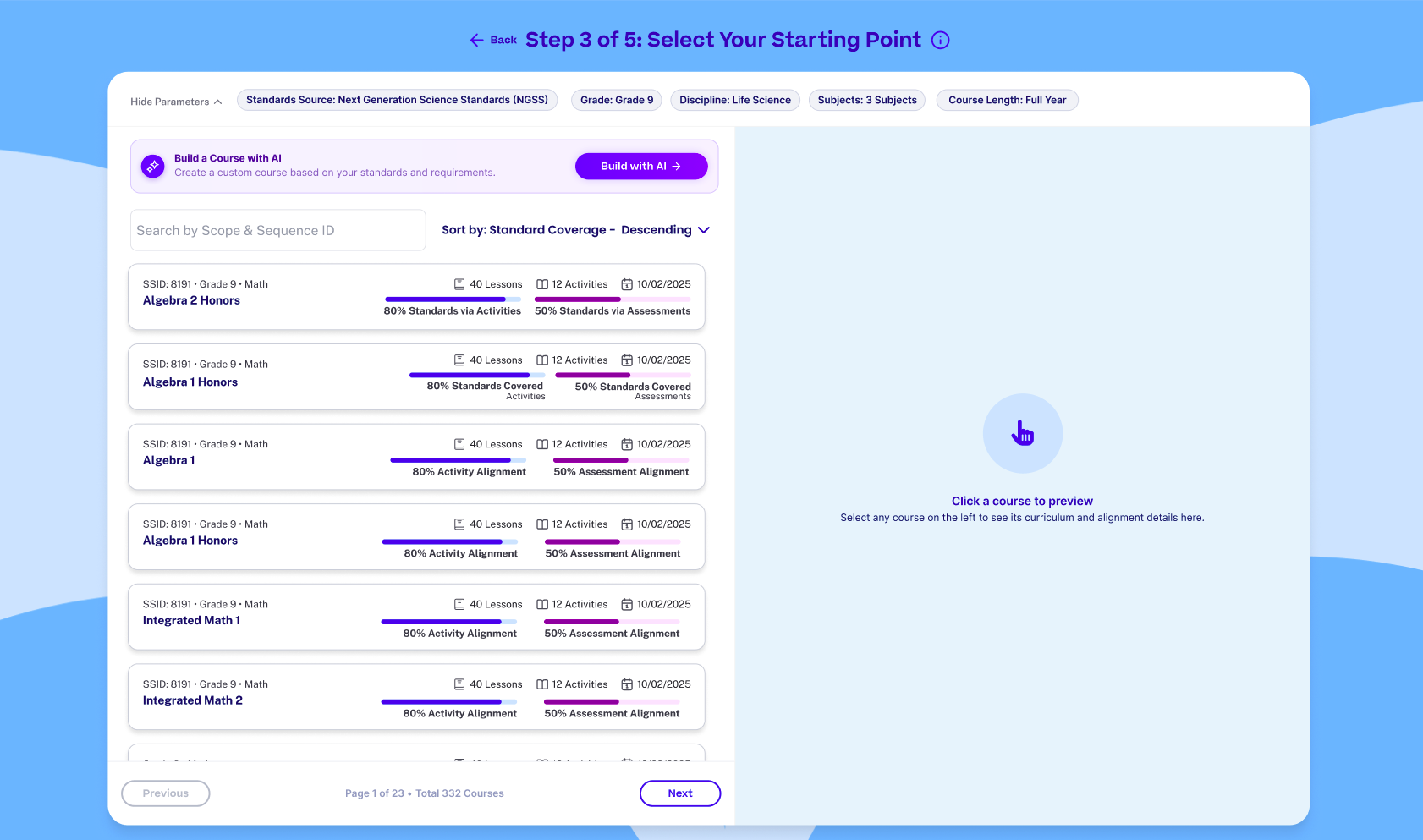
Reuse a course or build with AI.
Authors can begin with existing course content. When there is no suitable course to copy, V1 supports generating an outline with AI. The supplied starting-point design brings those paths together with course search and coverage information.
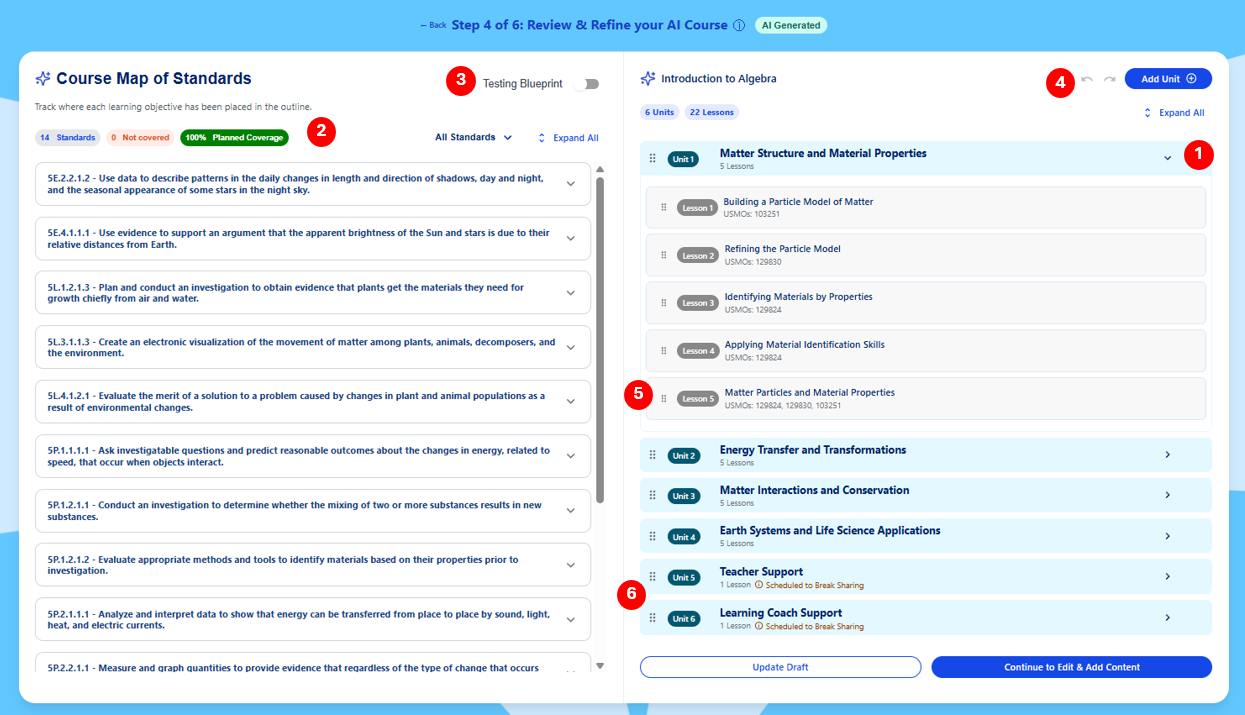
Inspect and edit the AI-generated outline.
Authors review where objectives are assigned, revise units and lessons, change objective placement, and reorder the structure. V1 release notes describe generated outlines targeting 100% planned coverage, with author editing and undo/redo controls. That target describes the plan, not a completed course or verified content coverage. [1, pp. 1–2]
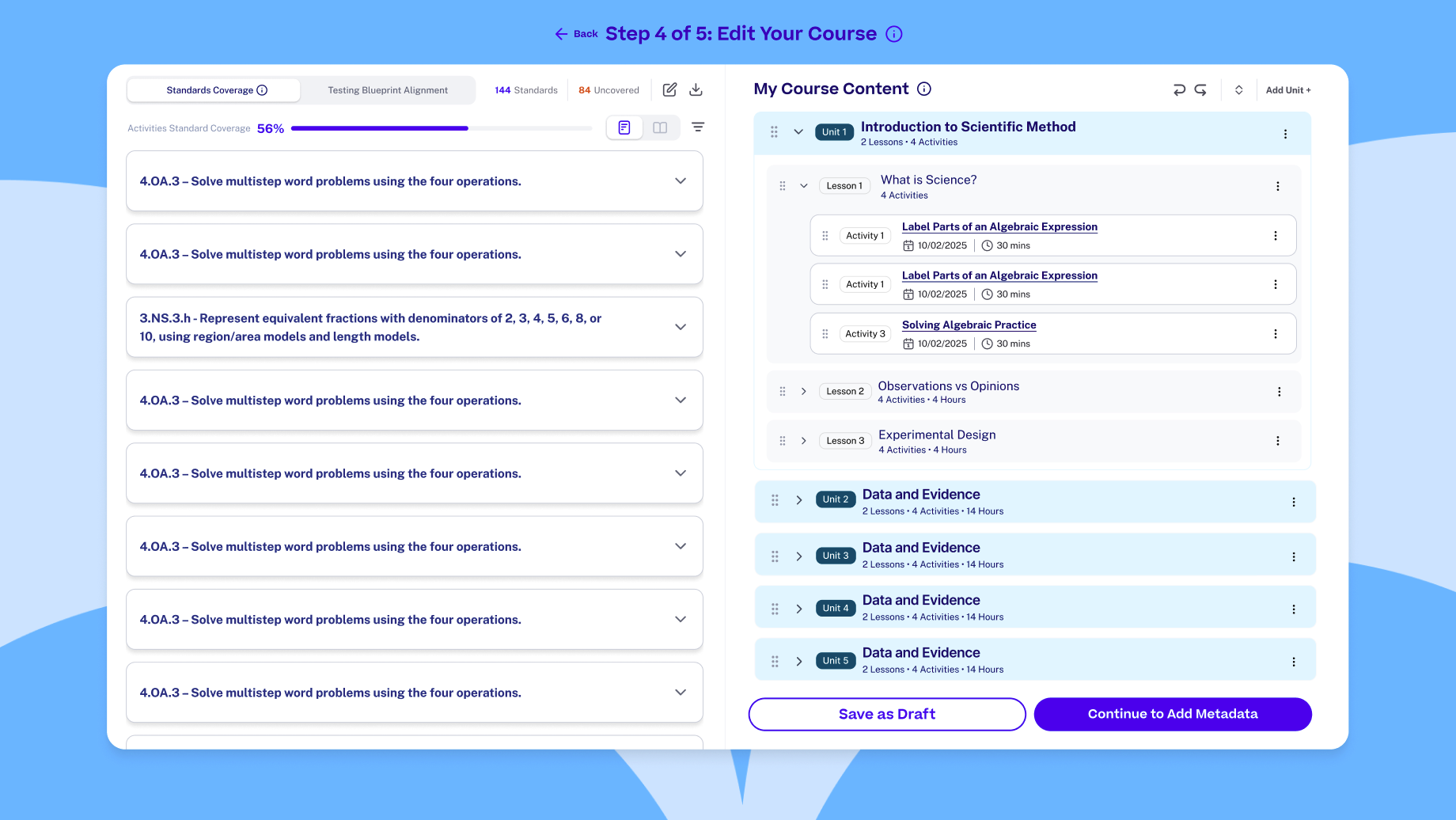
Use the materials to determine what is covered.
Authors add activities and assessments, then inspect how that content relates to the selected standards. The builder keeps standards and course structure alongside one another. The August MVP11 release added reciprocal coverage inspection: select a standard to see related units and lessons, or a lesson to see related standards. [5, pp. 1–2]
This makes the coverage model actionable: authors can move from a standard to the content that supports it, rather than relying only on an aggregate percentage. Exporting alignment also supports review outside the workspace.
Fit the existing publishing workflow.
CiaD sends assembled courses to Brightspot for review, approval, and publishing. The workflow also supports Learnosity assessments and AI-generated activities through existing integrations. The authoring experience had to preserve those relationships rather than introduce a disconnected destination. [2][6]
Design for the course
that does not fit the happy path.
CiaD depended on data retrieved from and stored across Brightspot, Learnosity, and other existing systems. Different course hierarchies, incomplete data, and synchronization delays affected what the interface could reliably display. Requirements continued to evolve alongside development.
I adapted designs as those constraints emerged and accounted for loading, saving, and recovery states. Two examples show why that work belonged to the core authoring experience:
Semester courses
Authors needed to manage separate semester courses while understanding their combined standards coverage. MVP10 documented support for rearranging content between semesters and sending them to Brightspot.
Failed synchronization
Before MVP10, a failed sync could require authors to start over or ask for technical support. The release added error details and the ability to reset a failed course, fix it, and send it again.
Delivered capabilities documented in MVP10, August 14, 2026. [7, pp. 1–2]
These states matter because course building is sustained work. A failure needs to explain what happened and provide a way forward, while semester support needs to preserve the relationship between separate structures and a shared standards set.
Add the designs you owned, the implemented states, and an example of an author recovering without restarting. The release notes establish availability, but the effect on task success and support requests has not been measured in the supplied files.
A workflow built
through successive releases.
The release notes document a progression from reusing content to a more complete authoring and alignment workflow. They also record limitations and fixes along the way; availability in one release does not mean every edge case was already resolved.
Create activities for content gaps.
AI activity generation through Mindsmith, with Brightspot review before publishing. [8]
Connect assessments to authoring.
Learnosity search and creation within CiaD, improved activity syncing, and saved progress when returning from Mindsmith. [6]
Strengthen the alignment foundation.
State testing blueprint support and updated standards data. MVP6 reported support for creating real back-to-school courses. [9][10]
Support recovery and inspection.
Semester support, failed-course reset, coverage inspection, and alignment export. [7][5]
Generate and review a course outline.
AI-generated scope and sequence, pre-assigned objectives, author editing, and a target of 100% planned standards coverage. [1]
Delivered capability.
Usability impact still to verify.
The specific design change is clear: I separated review of the AI-generated plan from content building, giving intended coverage and content-based coverage distinct roles. The intended benefit was to help authors identify remaining gaps without mistaking a complete outline for a fully supported course.
V1’s September 24 release notes establish that AI outlines and author review/editing shipped in beta. They support the delivery claim; they do not demonstrate that my workflow reduced confusion, missed objectives, or authoring time.
| Claim | Evidence | Status |
|---|---|---|
| Authors can review and edit AI-generated outlines. | V1 release notes and annotated review screenshot, September 24, 2026. | Delivered functionality |
| Authors can inspect alignment and export it. | MVP11 release notes, August 27, 2026. | Delivered functionality |
| Authors can manage semesters and reset failed courses. | MVP10 release notes, August 14, 2026. | Delivered functionality |
| Two stages help authors distinguish planned and actual coverage. | Design rationale in the case study document; no follow-up usability evidence supplied. | Intended benefit |
| The workflow reduces authoring time or missed objectives. | No confirmed before-and-after measurement for this decision. | Not measured |
Other release metrics describe improvements in the underlying platform. For example, MVP7 reported faster loading, and MVP6 reported stronger standards-to-objective linkage after a data integration. Those engineering and data improvements supported the experience, but I do not attribute them to my design work. [10][11]
Add observations of authors correctly distinguishing the two coverage states, task completion times, missed-objective rates, or support-request changes. For the “weeks to seconds” and approximately $10,000 effort claims in the supplied materials, add a dated baseline, task definition, measurement method, and owner before using them as measured outcomes.
The meaning of a metric
can change the workflow.
The turning point was recognizing that “coverage” was doing two jobs. One described intent; the other described support from content. Treating them as interchangeable would have made the interface look simpler while asking authors to untangle the ambiguity themselves.
I chose to make that distinction part of the workflow. The additional transition was deliberate: it let authors review the plan on its own terms, then build the course with a clear view of what remained unsupported.
This work also strengthened how I collaborate under ambiguity. Rapid prototypes helped me make abstract requirements concrete for PMs, SMEs, and developers. As the sole designer across evolving releases, I needed to preserve a coherent authoring experience while adapting to real constraints.
What I would evaluate next
I would ask authors to review an AI-generated outline, add an activity that supports only part of a lesson’s planned objectives, and identify what still needs content. The key questions are whether they interpret coverage correctly, find the remaining gaps, and move between stages without losing their place.
Evidence behind the story.
Ownership, design rationale, and tradeoffs come from my Course in a Day case study document. Release notes establish delivered capabilities. The external concept study supplies related research context; it is not validation of this internal workflow.
- CiaD V1 Release NotesSeptember 24, 2026 · beta for the Teaching and Learning team · AI outlines and author control, pp. 1–3.
- CIAM MVP1 Release Notes and Rollout PlanInitial internal rollout · content reuse, alignment, and Brightspot review, pp. 1–2. Release date not stated.
- Course in a Minute — Educator and District InsightsDecember 2025, as labeled in the report · 48-person concept survey and five interviews outside K12-partner schools, pp. 2, 8, 12.
- CIAD Competitive and Market AnalysisLast updated June 2026 · internal strategic context, pp. 1–4. Capability and market claims are not independently verified here.
- CiaD MVP11 Release NotesAugust 27, 2026 · alignment export and reciprocal coverage inspection, pp. 1–2.
- CIAD MVP4 Release NotesMay 20, 2026 · Learnosity integration, activity syncing, and progress preservation, pp. 1–3.
- CiaD MVP10 Release NotesAugust 14, 2026 · semester support and failed-course reset, pp. 1–2.
- CIAD MVP2 Release NotesFebruary 19, 2026 · AI activity generation and Brightspot review, pp. 1–5.
- CIAD MVP5 Release NotesJune 2, 2026 · state testing blueprints and coverage updates, pp. 1–2.
- CiaD MVP6 Release NotesJune 22, 2026 · standards integration and back-to-school course use, pp. 1–2.
- CiaD MVP7 Release NotesJune 29, 2026 · platform load-time improvements, p. 1.