Helping students
get unstuck.
Keep them thinking.
Designing an AI tutor students could start confidently, work alongside, and learn from—through an interface and a conversation shaped by research.
The initial research strategy focused on grades 6–10. The product scope later expanded to math support for grades 4–12. [1][2]
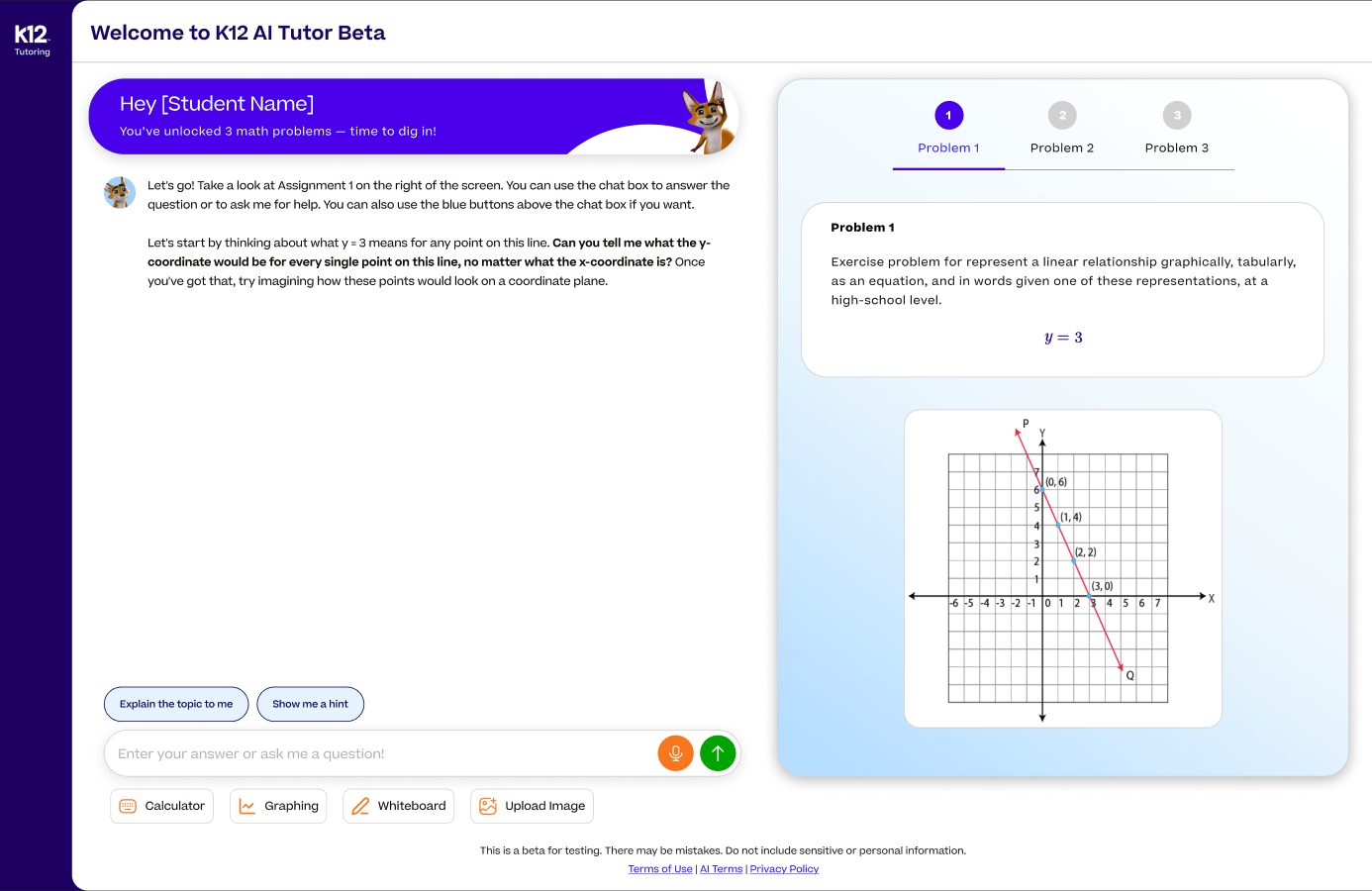
Help at the moment a student needs it.
Students often work independently, outside the hours when a teacher or tutor is available. When they get stuck, they retry a problem, check notes, ask someone they trust, or turn to search, video, and AI tools. Their goal is immediate support, but getting an answer is not necessarily the same as understanding how to solve the problem. [3]
Stride K12’s AI Tutor provides on-demand learning support through homework upload, skill practice, and educator-assigned sessions. The experience combines step-by-step guidance with tools such as video, graphing, and a whiteboard. Educators can assign targeted practice and review student work and insights; guardian support and broader subject coverage were part of the expansion plans. [2]
Make the next step clear enough to act on, while keeping the student responsible for the thinking.
That meant designing more than a chat window. Students needed to understand how to begin, use tools without losing the problem, and receive guidance that felt manageable when they were already confused.
I connected the interface to the tutor’s behavior.
I owned the UX/UI design and ran research, while partnering with researchers on additional studies. I influenced feature priorities with product, designed multimodal learning tools, and shaped how the tutor communicated with students—including step-by-step guidance, response length, and empathy.
To make those expectations implementable, I translated AIX guidelines into decision matrices and behavioral communication graphs, then worked directly with machine learning developers to implement them. This gave design and engineering a shared reference for decisions that otherwise risked becoming subjective discussions about tone or style.
My ownership
UX/UI design, research and synthesis, multimodal interactions, and translating AIX guidance into behavioral rules.
Shared collaboration
Product owned roadmap and prioritization. Engineering owned the application and AI implementation. Research partners contributed study expertise and findings.
Add your start and end dates, the patent title or application number, its status, and your specific contribution. Patent involvement is noted in the project worksheet; those details were not supplied.
Students wanted the help.
They needed a clearer path.
The August 2025 moderated study followed seven students in grades 8–10 through onboarding, problem solving, error recovery, progression, and ending a session. A post-session survey captured their perceptions. [4, pp. 2–3]
August 2025 · n = 7 · Moderated sessions and post-session feedback. [4, pp. 6–7, 15]
The enthusiasm did not erase the friction. Five of seven students did not finish the given problem during the roughly ten minutes allocated to problem solving. Two accepted incorrect tutor answers without recognizing the error. Students could value the help and still struggle to complete the task or judge the output. [4, pp. 9, 12]
Later research reinforced the same pattern: confidence shaped how students used the tutor. More confident learners explored and recovered from friction; less confident learners were more likely to pause when the next action was unclear. The January 2026 readout identified onboarding, prompt interpretation, tool expectations, latency, and reliability as recurring concerns. [5, pp. 5–6, 13–14]
Help students begin.
A useful tutor is hard to use if the student does not know what to do first.
What the research revealed
Students hesitated at the beginning, sometimes unsure where to type or whether to answer the tutor or a suggested prompt. The prompts were useful once understood, but some learners interpreted them as questions they were required to answer. [3, pp. 5, 12]
How I approached the design
I focused on orientation and clear next actions: explaining where to respond, making the relationship between the problem and conversation visible, and clarifying that suggested prompts were optional ways to ask for help. In the supplied interface, the opening message explicitly points to the assignment, the chat box, and the blue help buttons.
The tradeoff was how much to explain before learning begins. Too little orientation leaves students guessing; a long walkthrough adds another task before they can get help. The February testing plan therefore assessed the onboarding message directly: whether students would read it, whether it made starting easier, and whether they preferred a walkthrough or video. [6, pp. 3–4]
Offer enough direction to begin, then let the student use the conversation or a suggested prompt.
Add the earlier entry state and revised onboarding screen, labeled with version dates. The supplied files show the beta workspace and testing plan, but not a matched before-and-after pair or a measured onboarding improvement.
Support the work students do
between messages.
Learning happens in the scratch work, the graph, and the moment a concept becomes visible.
What the research revealed
Students asked for a whiteboard, videos, and richer graphing. They described switching between paper and the screen and wanting explanations close to the problem they were solving. The existing graph tool could also obstruct the equation and chat; students tried to move or dock it. [3, pp. 5–7]
How I approached the design
I designed multimodal tools as part of the tutoring workspace, with the problem, related media, and skill explanation organized alongside the conversation. Video offered another way into an explanation, while the whiteboard gave students a place to write and sketch within the experience.
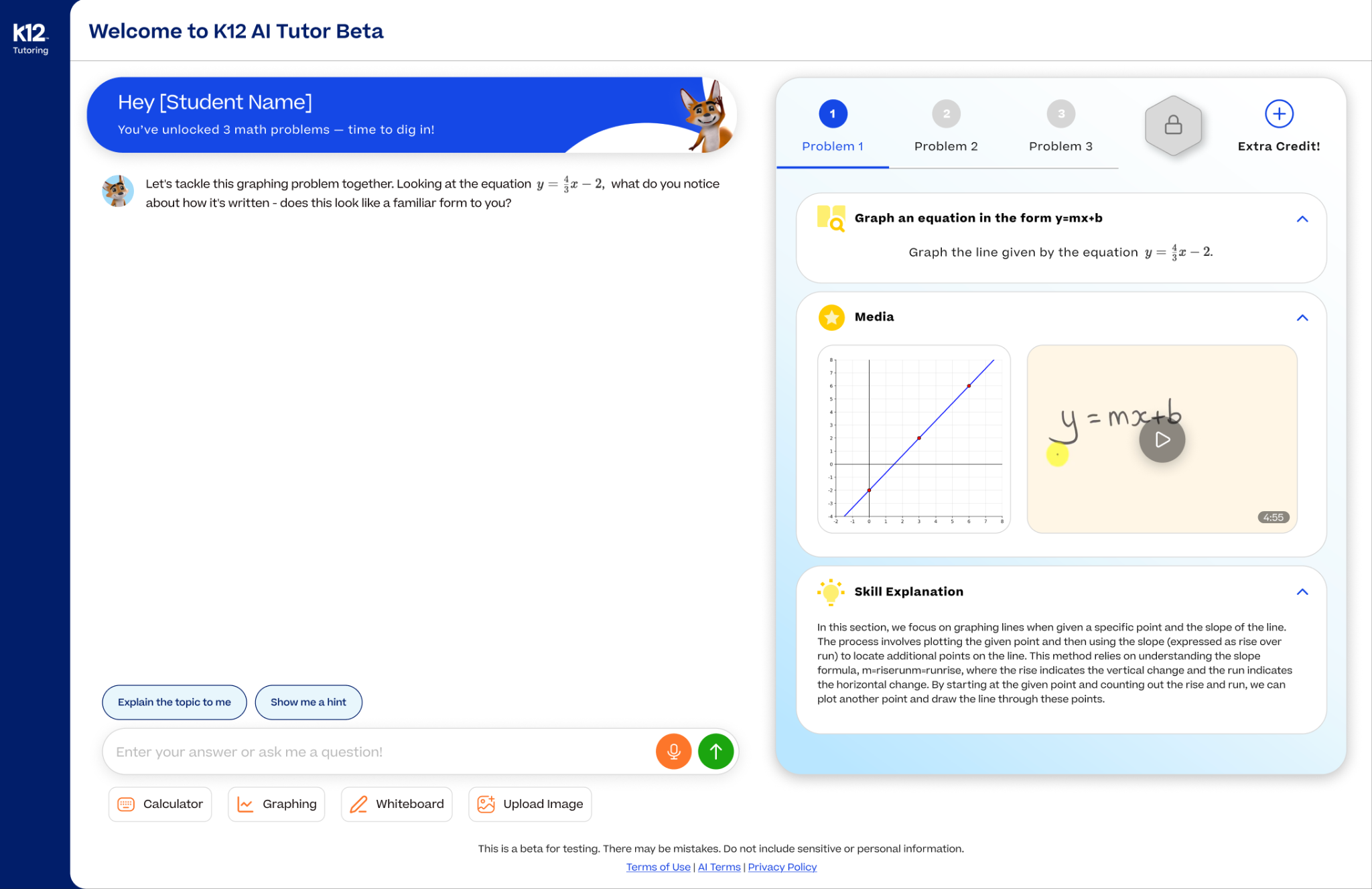
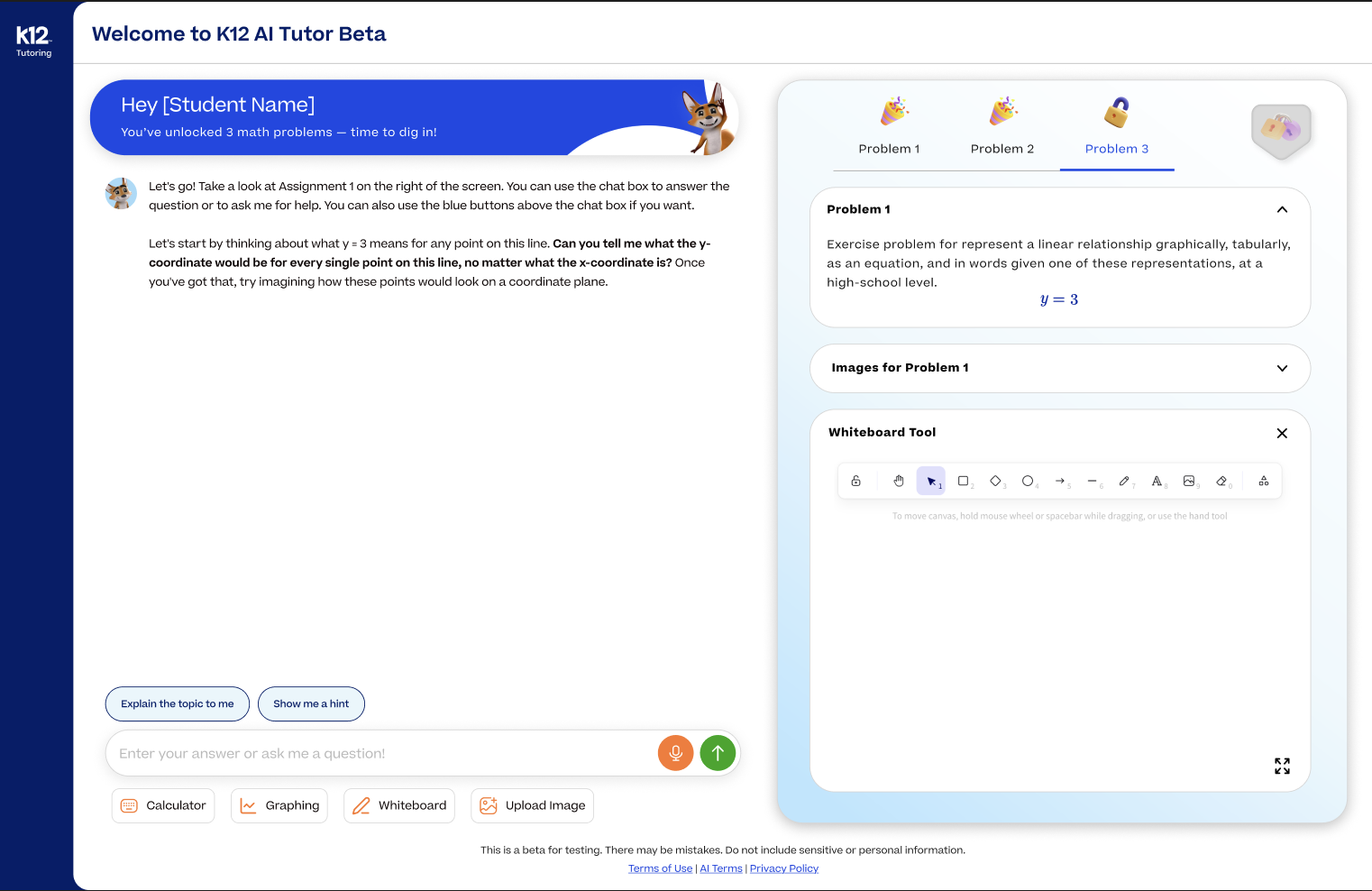
The tradeoff: more capability, more to manage
Adding a tool does not automatically make the task easier. A tool that blocks context, behaves unexpectedly, or is difficult to find can add friction. Students’ expectation that Math Keys would calculate—rather than only enter notation—made that mismatch especially clear. [3, pp. 5–6]
See the graphing state and its design tension
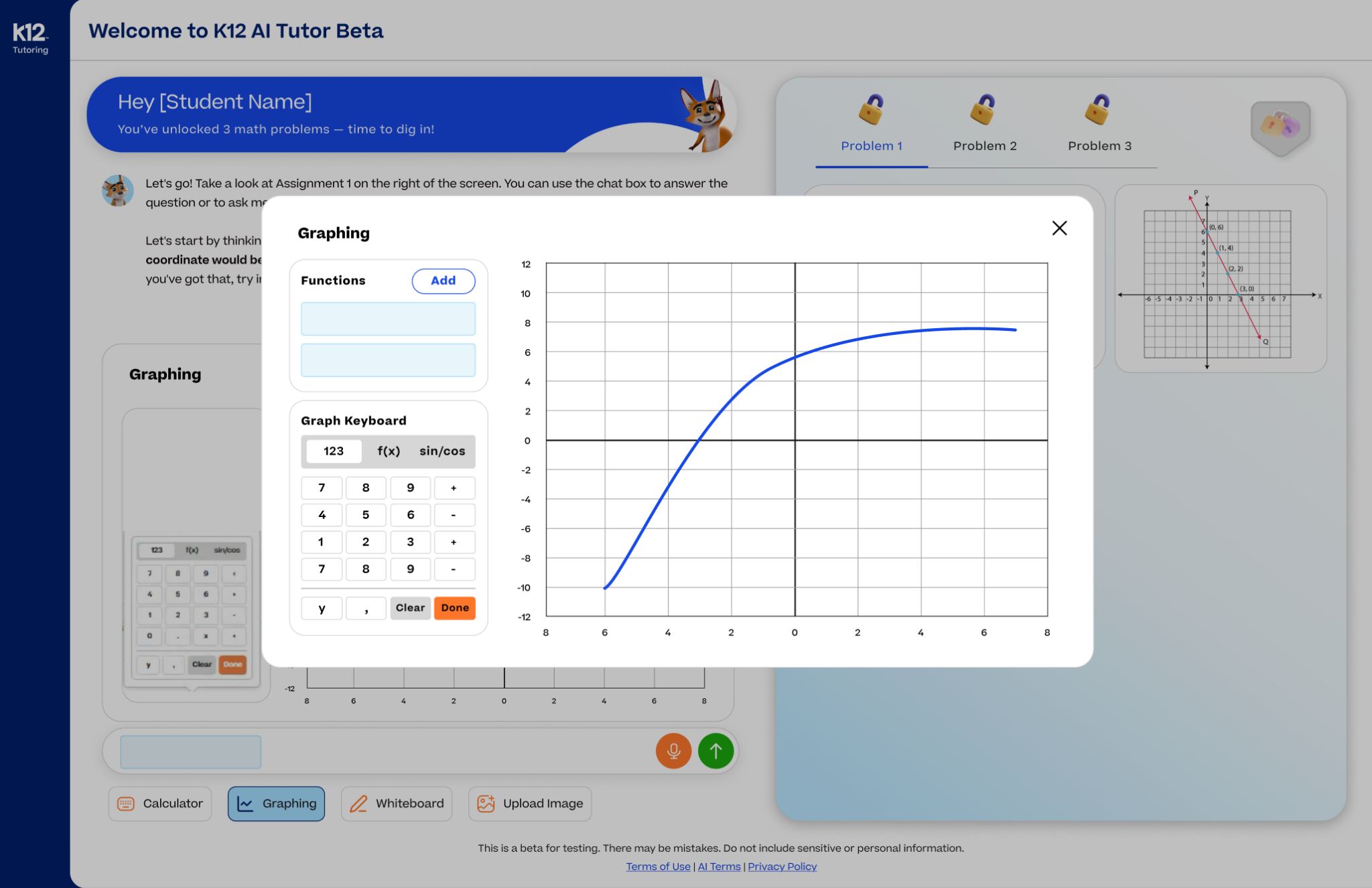
Give students a choice of ways to understand and show their work, while preserving access to the problem and tutor.
Add the shipped version, release date, and evidence of students independently using the whiteboard and graph. The February plan used moderator-controlled navigation, which limits what it can establish about hands-on usability.
Make the guidance manageable.
The response itself is part of the interface.
What the research revealed
Students valued step-by-step help that explained mistakes without doing all the work. But when they were confused, several wanted one question at a time rather than multiple requests in one response. Repetition and long explanations could leave them stuck even when the tutor appeared to be helping. [3, pp. 3–4, 13]
Tone preferences varied, too. Supportive correction worked well for many students, while some found excessive cheerfulness irritating. The evidence supported a more nuanced approach to empathy than simply making every response more enthusiastic. [3, p. 3]
How I translated feedback into behavior
I turned expectations for step-by-step guidance, response length, and empathy into AIX decision matrices and behavioral communication graphs. I worked with machine learning developers to implement those guidelines and adapted them as the system’s capabilities changed.
The research gave those rules a concrete purpose: keep the next request focused, make correction understandable, and use support that fits the student’s situation. The design tradeoff was between providing enough explanation to help and giving so much information that the learner could no longer identify the next action.
A focused next step
Use the student’s confusion as a signal to narrow the request rather than repeat a broad explanation.
Manageable guidance
Give enough context to understand the step, without presenting the entire solution at once.
Support that fits
Account for differing responses to encouragement rather than treating cheerfulness as universally helpful.
These are the research-informed design aims; the exact implemented thresholds and branch rules need the original guideline artifact.
Add the decision matrix or communication graph, its version date, and a before-and-after response to the same student input. Include the exact rule that changed and any follow-up SME or student evaluation. The supplied files establish implementation collaboration, but do not contain the rules or isolate their effect.
Designing for a system
that kept evolving.
Initial requirements were ambiguous, and dynamic AI outputs made it difficult to define every interaction in advance. We worked iteratively: prototype an experience, observe how the system and students responded, and refine the interface and behavior together.
Early agent capabilities and latency constrained what the experience could reliably support. Engineering moved from larger agents toward smaller, specialized agents, including responsibilities for Socratic guidance and answer generation. I adapted the designs and AIX guidelines as those capabilities changed, working with product and engineering to keep the intended experience aligned with the system.
That engineering evolution belongs to the engineering team. My contribution was translating changing capabilities into interactions and behavior expectations students could understand. The retrospective also identified the need to distinguish prototypes, MVPs, and the desired end state, and to strengthen feedback loops for tutor responses. [7, pp. 2–3]
Add the baseline, result, dates, and measurement method. The project worksheet describes improvement, but the supplied evidence does not quantify it.
A promising pilot.
A clear boundary on the claims.
The product moved from beta testing into summer school pilot use. The September 2026 research overview reported that students reached a correct answer 80% of the time, with an engaged subsample reaching 93.3%. It also reported an average session of 9.25 minutes. These are product-level observations, not a before-and-after measurement of my design changes. [8, p. 4]
Reported correct-answer rate
Summer school pilot · September 2026 research overview
Sample size and denominator are not specified in the supplied overview.| Evidence | What it shows | What it does not establish |
|---|---|---|
| August 2025 study 7 students · grades 8–10 | All seven said they would use the tutor again; four were unsure how to begin. | A proven onboarding improvement or broad adoption. |
| January 2026 readout Student and educator synthesis | Recurring strengths in tone and step-by-step support, alongside confusion about prompts and tools. | A controlled comparison of response guideline versions. |
| May 2026 overview 30 students reported to date | Reported helpfulness of 9.25/10 and trust of 8.93/10; video and whiteboard resonated in feedback. | Independent mastery or a measured effect of an individual feature. |
| September 2026 overview Summer school pilot | Reported correct-answer rates of 80% overall and 93.3% in an engaged subsample. | Learning retention, a causal design effect, or a verified comparison with the earlier cohorts. |
Sources: August analysis [4]; January readout [5]; May overview [2, p. 6]; September overview [8, p. 4]. These are separate reports and cohorts, not a single trend series.
The strongest claim about my contribution is specific: I owned the UX/UI, ran research, and worked with machine learning developers to implement AIX guidance. The product research shows why that work mattered and where it should continue—not that every positive result was caused by it.
Add pilot sample size, dates, the definition of “engaged,” the correct-answer denominator, and how outcomes were coded. Add follow-up evidence for the onboarding and response-guideline changes if available.
Design the next action,
not just the next response.
This project reinforced that AI experience design includes what the system says, what the learner can do, and whether those two things make sense together. A supportive response can still fail if the graph hides the problem, the prompt is misread, or the student does not know where to start.
My most consequential contribution was connecting research to both sides of that experience: the interface students used and the behavior guidelines developers implemented. In an evolving system, the shared decision framework was as important as the screen design.
What I would evaluate next
I would test whether students can begin without moderator help, use visual tools without losing context, and recover from confusion after the response-guideline changes. To evaluate learning, I would look beyond satisfaction and supported correct answers to whether students can solve a new problem independently.
Evidence behind the story.
Project ownership and implementation details come from my case study worksheet. Research findings are attributed to the reports below. Plans are treated as plans, and screenshots as specific design states.
- AI Tutor MVP1 Research Needs and StrategyDraft, last modified June 5, 2025 · initial audience and research scope, pp. 1–4.
- K12 AI Tutor Student and Educator OverviewMay 28, 2026 · product scope, reported feedback, and student tools, pp. 2–7, 11–18.
- AI Tutor Student Feedback Sessions — Combined Findings ReportConsolidated transcripts and interaction notes · tone, prompts, tool friction, and visual support, pp. 2–14.
- August 2025 AI Tutor User Testing AnalysisModerated study of seven students · methodology, observations, and survey feedback, pp. 2–23.
- AI Tutor Research ReadoutUpdated January 30, 2026 · confidence patterns, strengths, and experience gaps, pp. 4–20.
- February 2026 Student Testing PlanFeature-level validation plan · onboarding, homework upload, whiteboard, and video, pp. 1–6.
- AI Tutor & K12 Tutoring Retrospective12-month look back · collaboration, scope clarity, and feedback loops, pp. 1–4.
- Meet Beacon — A First Look at K12 Tutoring’s New AI TutorSeptember 2026 · summer school pilot observations, pp. 3–4.